In the realm of social media, where trends come and go, one app has recently taken the world by storm. Meta’s Threads, a revolutionary social networking platform, has achieved an astonishing feat, becoming the fastest-growing app in history. With over 100 million users in just five days, it has captivated the attention of individuals worldwide. In this article, we delve into the unprecedented rise of Meta’s Threads and explore the key factors that have contributed to its meteoric success.
Table of Contents
How Meta’s Threads Became the Fastest-Growing App in History
Meta’s Threads is a new app that has taken the world by storm. It is a text-based social network that allows users to share their thoughts, opinions, and ideas in up to 500 characters, with the option to add links, photos, and videos. Threads is built by the Instagram team and is compatible with the open, interoperable social networks that Meta envisions for the future of the internet. In this article, we will explore how Threads became the fastest-growing app in history, crossing 100 million users in just five days.
What makes Threads different from other social networks?
Threads is designed to be a positive and creative space for expression, where users can connect with friends and creators who share their interests. Unlike other social networks that focus on images or videos, Threads is all about text. This gives users more freedom and flexibility to express themselves in their own words, without worrying about filters, captions, or algorithms.
Threads also has a unique feature that lets users join public conversations on any topic they care about. Users can browse through different categories, such as news, sports, entertainment, or politics, and see what other people are saying about them. Users can then reply to threads or start their own threads to join the discussion. This way, users can discover new perspectives, learn new things, and have meaningful conversations with others.
Another difference between Threads and other social networks is that Threads is compatible with the open, interoperable social networks that Meta is working on. This means that users can share their threads across different platforms and apps, without being locked into one ecosystem. Users can also choose who can see their threads and who can reply to them, giving them more control over their privacy and safety.
How did Threads achieve such rapid growth?
Threads was launched on July 5th, 2023, by Meta CEO Mark Zuckerberg on his verified Threads account. He announced that Threads was a new app built by the Instagram team for sharing text. He also said that Threads was part of Meta’s vision for building a more open and connected internet.
The announcement generated a lot of buzz and curiosity among users, who quickly downloaded the app and started sharing their threads. The app received 30 million sign-ups as of July 6th, making it one of the most downloaded apps on both Google Play Store and Apple App Store.
One of the reasons why Threads attracted so many users was its simplicity and ease of use. Users could log in using their Instagram account credentials and start posting right away. They could also import their profile information and follow the same accounts they did on Instagram. Users could also easily share their threads to their Instagram stories or other platforms.
Another reason why Threads became popular was its relevance and timeliness. Threads offered users a new way to stay updated on what was happening in the world and join the conversation. Users could find threads on topics that mattered to them, such as the latest news, sports events, entertainment shows, or political issues. Users could also voice their opinions, ask questions, or share insights on these topics.
A third reason why Threads grew so fast was its positive and creative vibe. Threads encouraged users to express themselves in their own words, without any pressure or judgment. Users could also find inspiration from other users who shared their thoughts, stories, or ideas on various topics. Users could also interact with friends and creators who shared their interests and passions.
What are the benefits of using Threads?
Threads offers users a number of benefits that make it a valuable and enjoyable app to use. Some of these benefits are:
– It helps users express themselves better: Threads allows users to share their thoughts, opinions, and ideas in up to 500 characters, giving them more space and flexibility than other social networks. Users can also add links, photos, and videos to enhance their threads.
– It helps users connect with others who share their interests: Threads enables users to follow and interact with friends and creators who share their interests. Users can also discover new people who care about the same things they do.
– It helps users learn new things and gain new perspectives: Threads allows users to join public conversations on any topic they care about. Users can see what other people are saying about these topics and reply to them or start their own threads. This way, users can learn new things and gain new perspectives from others.
– It helps users be part of an open and interoperable internet: Threads is compatible with the open, interoperable social networks that Meta is working on. This means that users can share their threads across different platforms and apps, without being locked into one ecosystem.
Start Using Meta’s Threads
How can you get started with Meta’s Threads?
Are you curious about the new social media app that everyone is talking about? Here’s how to get started.
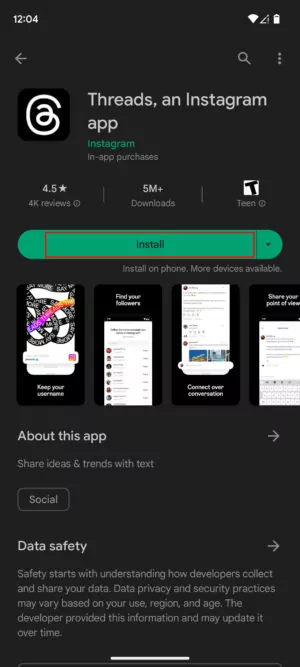
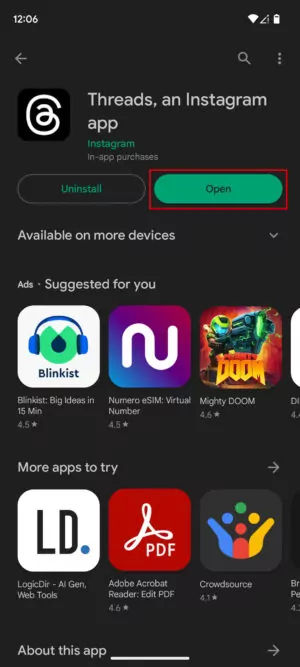
1. Go to the Google Play Store or Apple App Store and search for Threads, an Instagram app.
2. Download and install Threads on your device.
3. Open Threads.
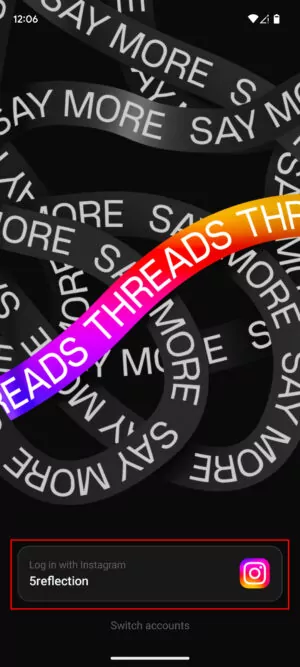
4. If you’ve already signed in to Instagram using the same device, you should see an option to Log in with your Instagram account. Tap on that option.
5. If you want to use a different Instagram account, you can tap on Switch accounts and enter your credentials.
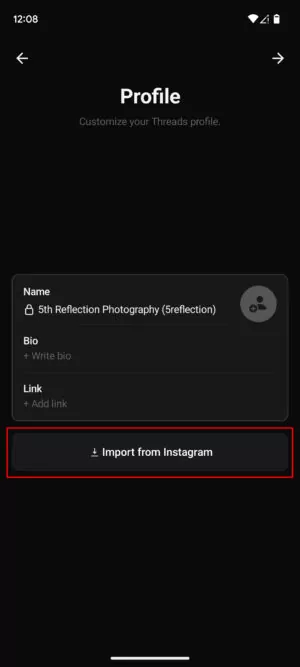
6. You’ll be prompted to fill out your Bio and add a Link of your choice. You can also upload a profile picture. Do this and then tap on the Next arrow.
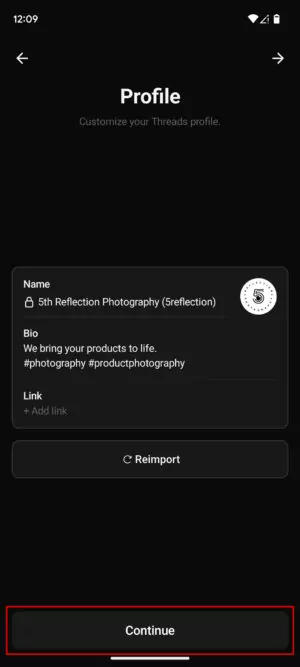
7. Or, you can tap the Import from Instagram button to keep your info synced with your Instagram profile. Then tap Continue.
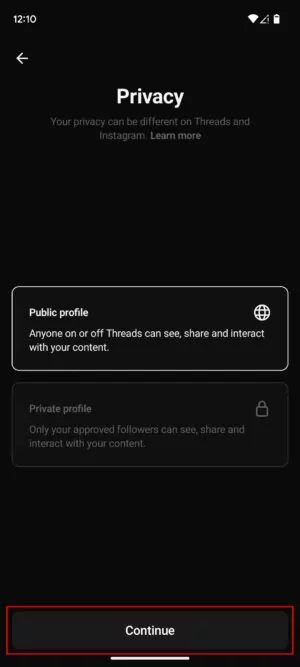
8. Choose whether you want a Public profile or a Private profile, then tap Continue.
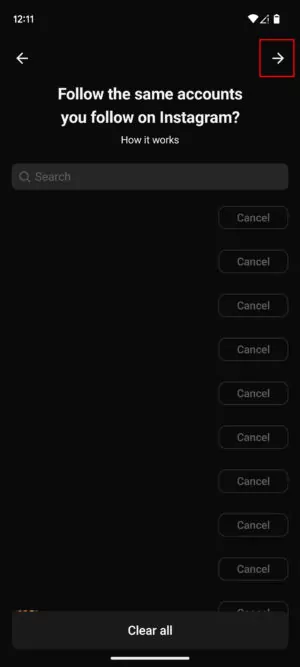
9. You can now choose whether you want to Follow all the same accounts you follow on Instagram, or select which ones to Follow. When you’re done selecting, tap on the Next arrow.
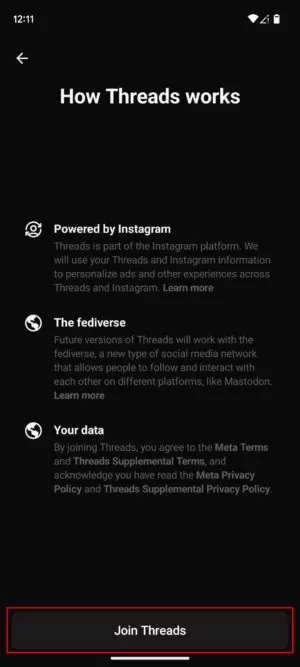
10. Tap on Join Threads.
11. Grant the necessary permissions for Threads to access your camera, microphone, contacts, etc.
12. You’re in!

You can tap on the Home tab to see the threads posted by people you follow. You can also use the Search tab to look for and discover content. The Compose tab will let you create and share content with the world. And the Heart tab will show you your Activity page and notifications. Finally, there’s the Profile tab, which lets you check your own activity.




You can also check out other guides on how to use Threads and more tips and tricks on our other posts on USA Trend.
FAQs
Here are some FAQs the most people ask:
What is Meta’s Threads?
Meta’s Threads is a text-based social network that lets users share their thoughts, opinions, and ideas in up to 500 characters, with the option to add links, photos, and videos.
Who created Meta’s Threads?
Meta’s Threads is created by the Instagram team and is compatible with the open, interoperable social networks that Meta envisions for the future of the internet.
How can I download Meta’s Threads?
You can download Meta’s Threads from Google Play Store or Apple App Store.
How can I log in to Meta’s Threads?
You can log in to Meta’s Threads using your Instagram account credentials.
How can I share my threads to other platforms?
You can share your threads to your Instagram stories or other platforms by tapping on the share icon on your thread.
How can I join public conversations on Meta’s Threads?
You can join public conversations on Meta’s Threads by browsing through different categories and replying to threads or starting your own threads.
How can I follow and interact with friends and creators on Meta’s Threads?
You can follow and interact with friends and creators on Meta’s Threads by tapping on the follow button on their profile or thread, or by sending them a message.
How can I control my privacy and safety on Meta’s Threads?
You can control your privacy and safety on Meta’s Threads by choosing who can see your threads and who can reply to them. You can also block or report users who violate the community guidelines.

Conclusion
Threads is a new app that has become the fastest-growing app in history, crossing 100 million users in just five days. It is a text-based social network that allows users to share their thoughts, opinions, and ideas in up to 500 characters, with the option to add links, photos, and videos.
Threads is built by the Instagram team and is compatible with the open, interoperable social networks that Meta envisions for the future of the internet. Threads offer users a number of benefits, such as helping them express themselves better, connect with others who share their interests, learn new things and gain new perspectives, and be part of an open and interoperable internet.
If you want to join the hottest social network, download Threads today and start sharing your threads.
If you enjoyed this article, you will love our other posts on USA Trend. USA Trend (usatrend.us) is your ultimate source of news, trends, and insights on the latest developments in the world of social media, technology, and entertainment. Whether you want to learn more about Meta’s vision for the future of the internet, discover the best apps and games for your devices, or find out what your favorite celebrities are up to, we have it all covered for you.
Don’t miss out on our amazing content and subscribe to our newsletter today. Thank you for reading and stay tuned for more!
References
Meta, New York Post, androidauthority.com, axios, sfgate.com, CNN Business, etc.
